

Databases and storage on several servers
On Business and Enterprise, a managed PostgreSQL database, key-value store, ClickHouse database, or SeaweedFS storage can run on 2 to 5 Storage Nodes, each on its own host. One server is the primary and takes all reads and writes; the others are copies that follow it. When the primary is lost, a copy takes over. In production, also run at least two Relays on hosts other than the Opfield host, in different failure domains, so that links to the database do not depend on the Opfield host; see How many Relays.
Links, bindings, and Opfield’s own tools always reach the primary. Copies serve only failover and backups, not reads.
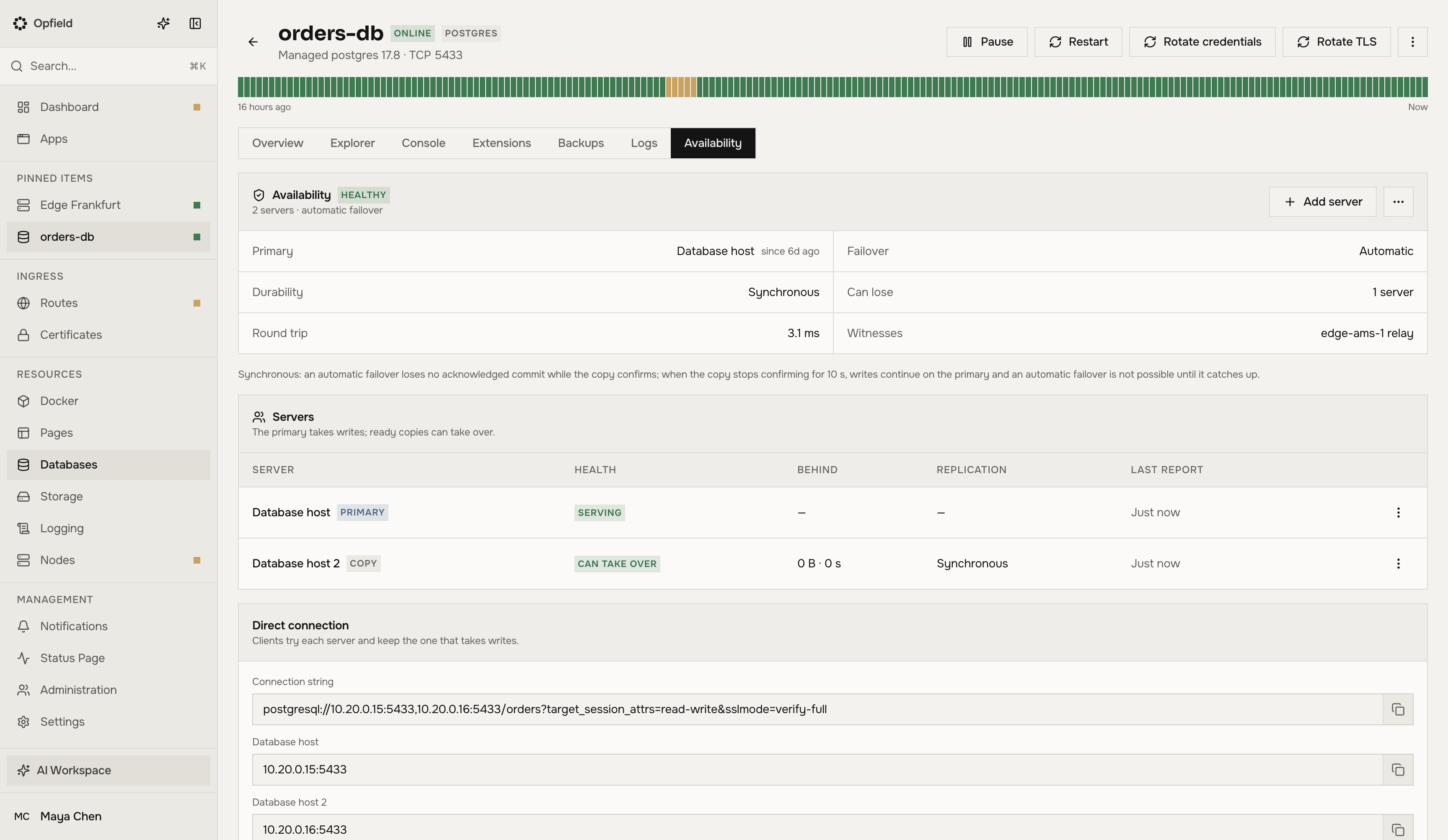
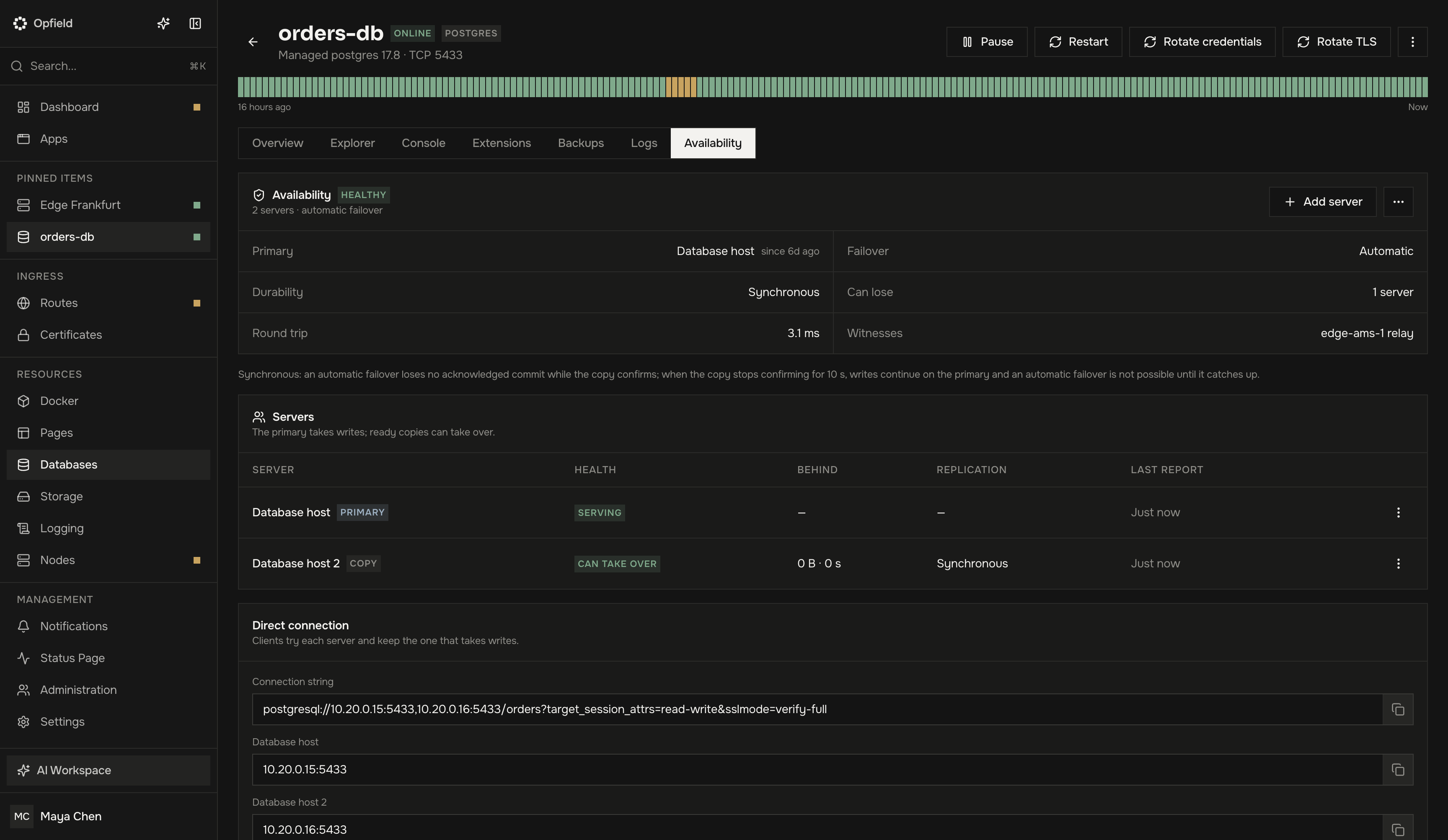
Turn it on
Section titled “Turn it on”- For a new resource, use Availability in the create form.
- For an existing one, use Make available… on its page.
Before anything changes, the preflight shows the mode, the servers and witnesses, the measured round trip between the servers, the durability, and what a failover can lose. Turning it on for an existing resource restarts it once; it keeps its data and serves from its server while the copies are filled.
The Availability tab of the database or storage then shows the servers with their role, health, and lag, the witnesses, the settings, and the events.
Automatic failover and witnesses
Section titled “Automatic failover and witnesses”Automatic failover needs a majority of voters on separate hosts. The voters are the data servers plus witnesses. A witness votes on which server is primary and holds no data. With two data servers, Opfield adds one or three witnesses, so one data server, or one data server and one witness, can fail.
A witness runs on:
- a relay that an administrator allowed to host witnesses, in Settings → Relay, column Witnesses (
PATCH /api/system/relay/instances/{id}, MCPmanage_relay_poolset_witness_hosting); Opfield prefers allowed relays; - or a Docker Node on another host.
A protected relay hosts witnesses only after its owner allowed it in the relay’s local configuration; until then Settings → Relay shows “Protected relay: needs local opt-in”. For ClickHouse, the witnesses are ClickHouse Keeper voters that hold no data.
Two servers without a witness: manual failover
Section titled “Two servers without a witness: manual failover”When there is no third host for a witness, two servers make a replicated pair with manual failover: the copy follows the primary, but nothing switches by itself. When the primary is lost, switch to the copy with Make this copy primary.
To make sure two primaries never take writes, a primary stops taking writes when it can reach neither Opfield nor its copy for 30 seconds.
When Opfield is down
Section titled “When Opfield is down”Failover works without Opfield. The servers and relays decide which server is primary among themselves, for as long as the relays’ signed policy is valid: the relay policy lease, 72 hours by default, which the preflight offers to raise to 7 days (Settings → Relay, Policy lease). See Relays without Opfield.
What happened meanwhile reaches Opfield when it is back, with the time it happened, in the audit log and in alerts. Backups wait for Opfield, because Opfield schedules them. A replicated pair without witnesses can still be switched only through Opfield.
What a failover can lose
Section titled “What a failover can lose”“Acknowledged” means that the client received a success.
| Engine and state | What an unplanned failover can lose |
|---|---|
| PostgreSQL, synchronous, healthy | Nothing acknowledged. A commit whose client gave up waiting for it can be lost if the primary dies within about 5 seconds; Opfield records it. |
| PostgreSQL, synchronous, copy fallen behind | No automatic failover. A copy that stops confirming for 10 seconds is dropped from synchronous replication and writes go on; a manual switch then loses the writes since then, and Opfield shows the time and an estimate. |
| PostgreSQL, asynchronous | Up to the lag limit (1 MiB by default) plus about 1 second of writes. A copy further behind cannot take over. |
| Key-value store (always asynchronous) | Up to the lag limit (1 MiB by default, usually under 1 second). |
| SeaweedFS objects | Nothing while both copies are writable: each write is acknowledged after both servers stored it. While a server is down for more than 10 seconds, new objects are stored once until it returns, and are lost only if the remaining server’s disk is lost. |
| SeaweedFS object and bucket metadata | Up to about 1 second of changes. |
| ClickHouse, near servers | Nothing acknowledged while healthy. |
| ClickHouse, far or degraded | Inserts the copy had not fetched yet; they come back when the old server returns with its disk. |
Durability
Section titled “Durability”Durability is synchronous by default when the servers are near (round trip up to 10 ms): a commit returns after the copy has it. It is asynchronous when they are far: a commit returns at once, and a failover can lose the most recent writes. Change it on the Availability tab. Synchronous durability on far servers makes every commit wait for the round trip.
Opfield measures the round trip every 10 minutes and alerts when a synchronous set has become far apart, without changing its durability.
Switching by hand
Section titled “Switching by hand”Make this copy primary is a planned switch without loss when the primary serves and the copy is up to date. When the primary is gone or the copy is behind, the switch can lose recent writes: the dialog shows the estimate and asks you to confirm it (API and MCP: acceptDataLoss: true). The old primary comes back as a copy.
Connecting clients
Section titled “Connecting clients”Links and bindings follow the primary by themselves. For direct connections to a published resource, use the connection string from the resource’s page: it names every server, and a client that tries each one keeps the one that takes writes. A copy refuses client connections.
Everyday operations
Section titled “Everyday operations”While a resource runs on several servers, its usual actions cover every server:
- Changing settings or the version and restarting go one server at a time, copies first. When the primary needs a restart, it first hands over to an updated copy without loss, so the resource keeps serving.
- Pausing, also when the app it belongs to is shut down, stops the copies first and then the primary, which keeps its role, so nothing fails over. Unpausing starts the primary first.
- Before a node’s daemon is updated, a primary on that node hands over to a healthy copy.
- Backups read from an up-to-date copy when there is one, otherwise from the primary.
- A copy can be rebuilt: its data is copied again from the primary, and it cannot take over until that is done. Servers can be added and removed; a set keeps at least two servers.
- Turning a database’s TLS on or off is refused while availability is on.
- Turn off availability keeps the primary as the single server and removes the copies. Deleting the resource turns availability off first.
Alerts and notices
Section titled “Alerts and notices”The database alert categories and Managed storage offer events for failover, switch, degraded, no automatic failover, restored, server not reporting, copy no longer synchronous, servers now far apart, witness lost or moved, and rejoin and rebuild, and metrics for replication lag (bytes and seconds) and round trip. The Availability tab lists the same events. The Dashboard shows a notice while a set cannot fail over, while the primary of a replicated pair does not report, while a witness is lost, while a set is degraded, and for a day after a failover.
Plan and license
Section titled “Plan and license”Running on several servers is a Business and Enterprise feature, including replicated pairs with manual failover. After the license grace period, everything that runs keeps running: failover, fencing, copies rejoining, Make this copy primary, rebuilding a copy, removing a server, turning availability off, and witness moves. Turning it on, adding a server, and changing settings are refused until the license is renewed. See Plans and entitlements.
API and MCP
Section titled “API and MCP”REST: /api/databases/managed/{id}/availability and /api/managed-storage/{id}/availability (preflight, turn on, settings, members, make primary, rebuild, events, turn off). The resource’s edit scope (databases:edit or storage:edit) is needed for changes, its view scope for reads. MCP: the availability actions of manage_managed_database and manage_managed_storage, and set_witness_hosting of manage_relay_pool.