

Compose Projects
Opfield discovers external Docker Compose applications and can manage single-node Compose Projects as durable resources. A project groups services, configuration, immutable revisions, lifecycle operations, logs, Routes, and database bindings under one stable identity.
External discovery is available on every plan. Creating or adopting a managed single-node project requires Personal or higher. Git-backed Compose builds require Business or Enterprise and an online dedicated Build Worker.
Decide between visibility and ownership
Section titled “Decide between visibility and ownership”Discovery gives teams a shared view of an existing Compose application without changing who operates it. Adoption changes the ownership model: Opfield becomes the place where configuration revisions and lifecycle actions are performed. Make that transfer explicit with the application owner, because continuing to run an independent docker compose workflow after adoption creates competing desired states.
Choose managed Compose when several services must be reviewed, applied, stopped, recovered, and audited as one application on one Docker Node. The project owner should define service dependencies, data ownership, secret sources, acceptable downtime, and the rollback conditions for configuration changes. For eligible mount-free projects, Business and Enterprise can enable Workload Availability (HA) to replicate the whole project or replace its serving placement after node loss. Services within each placement stay on one node; Opfield does not split a Compose project across a cluster.
A successful project has one understood configuration owner, a reproducible active revision, healthy required services, known persistent volumes, working Routes and private bindings, and no unexplained drift.
External and managed projects
Section titled “External and managed projects”An external project is discovered from canonical Docker Compose labels on its containers, volumes, and networks. Opfield shows inventory, status, service health, monitoring, and aggregated logs, and permitted users can open a service container’s console or file browser. External projects are read-only: Opfield does not read the host Compose file and offers no start, stop, restart, revision, secret, or delete action until an operator explicitly adopts the project. Keep operating an external project with its original docker compose workflow, or adopt it. For access design, see Operate workloads without adopting them.
A managed project stores its authored Compose YAML, variables, protected secret keys, and immutable revisions in Opfield. The Docker daemon applies the selected revision through Opfield’s pinned Compose runtime. Single-node lifecycle is available on Personal and higher. Multi-node Workload Availability is available on Business and Enterprise; metric autoscaling and same-node replica scaling remain In development.
Project-owned child containers, named volumes, and non-external networks are controlled through the Compose Project. They are hidden or protected from conflicting standalone lifecycle actions: an individual Compose container cannot be started, stopped, restarted, edited, recreated, or deleted on its own, whether the project is external or managed. Lifecycle actions apply to the whole project. Images and explicitly external or shared resources remain global Docker resources.
Create a managed project
Section titled “Create a managed project”- Open Docker > Compose and select New Project.
- Choose an online Docker node with the Compose capability.
- Enter a complete single-file Compose configuration.
- Provide non-secret variables and identify protected secret keys separately.
- Run validation and resolve unsupported options, missing variables, port conflicts, or policy violations.
- Create the project and follow the first apply operation to completion.
- Verify every expected service, health state, network, volume, and aggregated log stream.
Manual projects are image-only: images must already be pullable by the target node. Business and Enterprise can attach an allowlisted Git source. Bounded Compose build sections are then resolved by isolated Build Workers, vulnerability policy is applied, and the resulting immutable revision pins approved image digests before deployment.
Adopt an external project
Section titled “Adopt an external project”Adoption is an explicit ownership transfer. It requires Personal or higher and both docker:compose:create and docker:compose:manage for the project. Open the discovered project, choose Adopt into Opfield, and paste the complete configuration that Opfield should own. Opfield does not read the Compose file from the host, so the editor starts empty. Opfield validates the YAML, stores it as the first immutable revision, and then applies it with Adopt & Apply.
Confirm that the submitted YAML matches the running application’s services, volumes, networks, variables, and secrets. Opfield never trusts a label-supplied host path as source input. After adoption, future changes must go through new revisions rather than direct child-container mutation.
What adoption keeps and what it changes
Section titled “What adoption keeps and what it changes”- Project name. The adopted project keeps the name Docker already reports, and Opfield runs every operation with that Compose project name. Opfield does not rename or prefix the project, its services, or its volumes. A top-level
name:in the YAML is optional, but if present it must equal the project name. - Named volumes. Because the project name is unchanged, Docker Compose resolves the same volume names as before—
<project>_<volume>by default, or the explicitname:of a volume—and reuses the existing volumes and their data. Volumes declaredexternal: trueare referenced, not created. Before the first apply, compare the volumes listed on the discovered project with the volumes that the submitted YAML resolves to; a renamed volume key creates a new, empty volume. - Containers. Opfield adds its own management labels to each service, so expect the first apply to recreate the service containers. Plan a short maintenance window.
- Environment and secrets.
env_fileand a project.envfile are not used. Declare variables in each service’senvironment:and reference values with${NAME}. Opfield supplies non-secret variables and encrypted project secrets for interpolation when it applies a revision. In the Console, the Variables and Secrets tabs become available after adoption; use${NAME}placeholders for values that you will add there. - Host bind mounts. Bind mounts are rejected, including relative paths such as
./config:/etc/app,~paths, and sources built from variables. Move configuration files into the image or a named volume before adoption. - One-off jobs. Opfield has no equivalent of
docker compose run, and no pre-deploy or release hook. For a migration step, either run the command in a service container through the console, which requiresdocker:containers:console, or model it as a service withrestart: "no"that other services wait for throughdepends_on. Usecondition: service_completed_successfullywhen other services must wait for the job to finish. A one-shot service that exits with code 0 counts as complete, so it does not mark the project degraded.
Supported Compose configuration
Section titled “Supported Compose configuration”Manual and adopted revisions accept a single-file Compose document up to 1 MiB, without YAML anchors or aliases. Top-level keys are limited to name, version, services, volumes, and networks, so include, top-level secrets and configs, and x- extensions are rejected.
Each service must use image and may use only these keys: image, command, entrypoint, working_dir, user, hostname, environment, labels, ports, volumes, networks, depends_on, healthcheck, restart, extra_hosts, cpus, cpu_shares, mem_limit, mem_reservation, memswap_limit, pids_limit, and logging. Everything else is rejected, including build, env_file, container_name, privileged, cap_add, devices, network_mode, pid, ipc, security_opt, tmpfs, ulimits, deploy, profiles, extends, service-level secrets and configs, and links.
Other rules:
restartmust beno,always,on-failure, orunless-stopped;- ports cannot use ranges and must be TCP or UDP;
- a service network entry can set only
aliases, and every network a service uses must be declared at top level, except the implicitdefaultnetwork; - every named volume a service mounts must be declared at top level;
- a long-syntax volume mount can set only
type,source,target, andread_only, must includetype(VOLUME_TYPE_REQUIREDotherwise), and must usetype: volumewith a named volume as its source; depends_onaccepts a list of services or a long-syntax mapping; in the mapping form, each entry can set onlycondition, which is required and must beservice_started,service_healthy, orservice_completed_successfully; every dependency must be a service in the same file;- top-level volumes and networks can set only
external,name,driver, andlabels, sodriver_optsis rejected; loggingcan set onlydriverandoptions; the driver must bejson-file,local, ornone, and options are limited tomax-size,max-file, andcompress(nonetakes no options);- labels that start with
com.docker.compose.,wiolett.gateway.,net.wiolett.gateway., orcom.wiolett.gateway., and the labelgateway.sandbox, are reserved, and a label key built from a variable is refused; - a network cannot be the host network (
hostornone) or one of Opfield’s internal networks (gateway-secure-links,gateway-db-*,gateway-storage-*), and a network name built from a variable is refused; - variables and secrets cannot use the names the Compose client reads itself:
PATH,DOCKER_HOST,DOCKER_CONTEXT,DOCKER_CONFIG,DOCKER_CERT_PATH,DOCKER_TLS_VERIFY,DOCKER_TLS,DOCKER_API_VERSION,DOCKER_DEFAULT_PLATFORM,DOCKER_BUILDKIT, and every name that starts withBUILDKIT_orCOMPOSE_; otherDOCKER_*names stay ordinary variables; - every
${NAME}reference needs a provided variable or secret.
A project saved before these network, label, and variable rules existed keeps running and can still be stopped and brought down, but creating a revision, applying, starting, and restarting it are refused until its configuration follows them. That includes the first apply after the Docker daemon update.
On a node whose default log driver is json-file, the Docker daemon gives every service without logging json-file rotation at 50 MB × 3, the same limit single containers get. To keep a service’s logs longer, set your own max-size and max-file; driver: json-file without options keeps Docker’s unlimited default. Docker cannot change the log settings of an existing container. After the update to 2.11, the first apply therefore recreates every service once, even for an unchanged revision: each service receives the new log settings and a label with the digest of its own configuration. From then on an apply recreates only the services whose configuration changed. A node whose Docker daemon has not been updated yet applies revisions without their logging sections and keeps Docker’s defaults.
Opfield and the Docker daemon apply the same rules, so a revision that passes validation is not rejected later when it is applied. Business and Enterprise projects with a Git source can additionally use a bounded build section; see Create a managed project. The same rules apply to revisions created through the API, MCP, or AI Workspace. Rewriting a Compose file to fit these rules is part of adoption planning, so do it in staging first.
Revisions and lifecycle
Section titled “Revisions and lifecycle”Editing configuration creates a new immutable revision. Use Pull & Apply to pull required images and apply the active revision, Start or Stop for project lifecycle, and Change revision to reapply an earlier valid revision. Inactive revisions can be removed when no operation uses them; the active revision cannot be deleted.
Applying a revision recreates only the services whose own definition changed—image, environment, command, ports, volumes, networks, limits, labels, logging, or another service field—or whose interpolated variables or secrets changed; the other services keep running. Pull & Apply also recreates a service whose image tag now points to a newer image. Placements of a project under Workload Availability still carry the digest of the whole revision, so a new revision recreates all of their services. An apply without a pull fetches only the images that are missing on the Node. A revision whose published TCP port is already held on the Node by a Deployment, an Availability replica, a managed database, or managed storage is refused when it is created, with 409 COMPOSE_HOST_PORT_IN_USE; for a project built from Git, the build fails with that message and no revision is created. A project shows degraded when one of its services stops outside Opfield, and the status page reports it. On a project with Workload Availability, a start, stop, or restart requested while the previous Availability operation still runs is queued and runs after it.
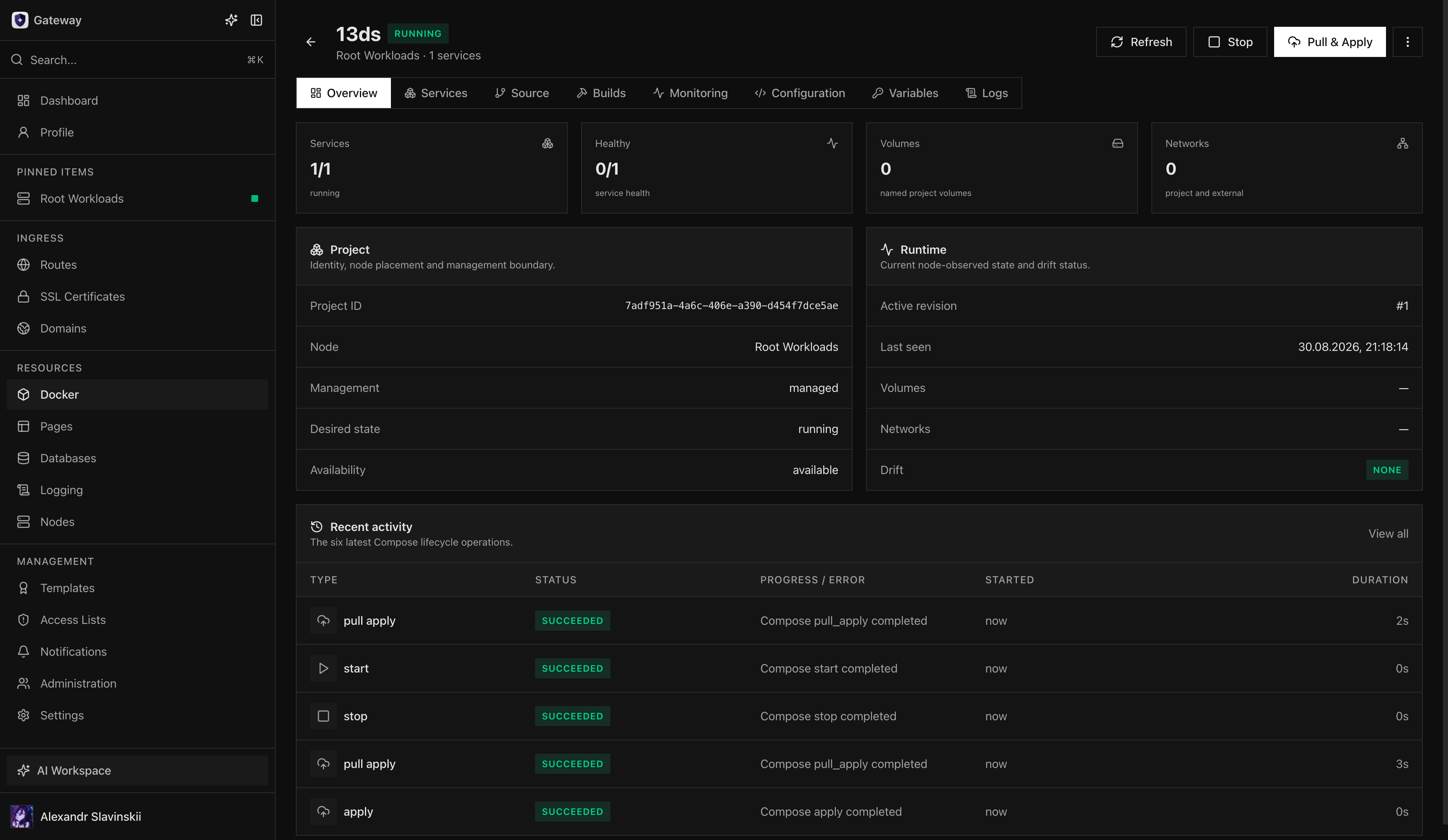
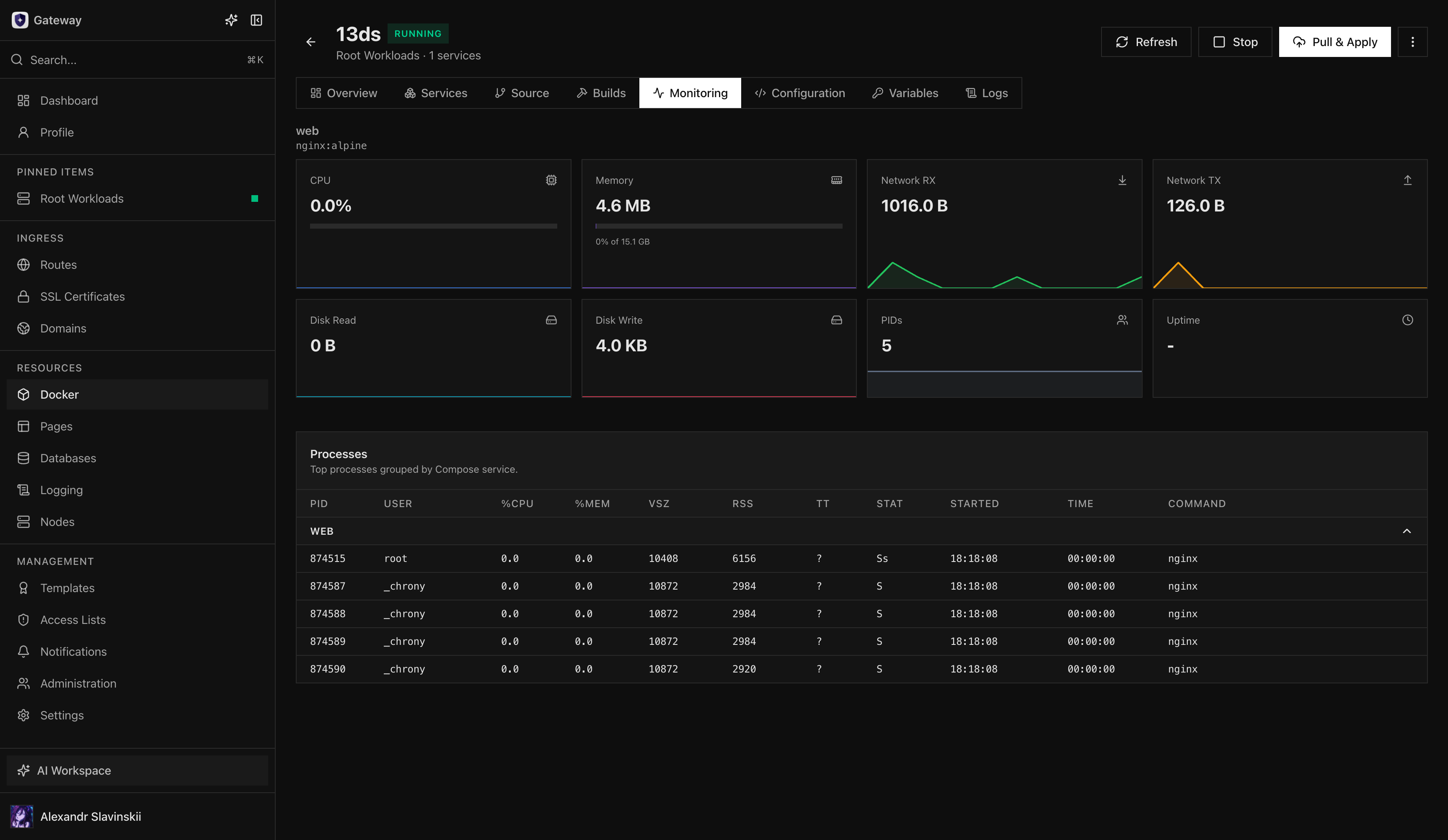
Lifecycle work is represented by durable operations and Tasks. Reloading the page does not cancel an operation. While a Git build is being rolled out to the project, revision, lifecycle, secret, and delete actions return BUILD_ROLLOUT_IN_PROGRESS until the rollout ends; cancelling an operation remains possible. During an Opfield update, new Compose operations are refused with GATEWAY_UPDATING. If cancellation is available, refresh the project and daemon-reported state before starting a replacement action.
Routes and database bindings
Section titled “Routes and database bindings”Routes and Secure Links can target a managed Compose service by stable project and service identity rather than an ephemeral container name. Managed database bindings update the project’s revision while preserving authored configuration and protected secrets. Removing a service or binding must go through a new revision so Opfield can reconcile dependent relationships safely. Applying an older revision keeps the current bindings; a revision that does not define a bound service is refused until that binding is deleted. Through the API, MCP, or the assistant, a service can be bound before the project’s first revision; see Workloads that are not running.
A new revision carries each database link whole—its network, variables, and the host alias of the link’s private endpoint—so applying it starts the service with the link already resolvable, in one operation. Adding, removing, or repairing a link on a running project applies the project once without pulling its images and without recreating its other services. A project built from a Git source can take and drop links too: Opfield applies a copy of the built revision that keeps the repository’s Compose file and its Git lineage, and a later push keeps the link and its secrets. The project overview shows each link’s runtime: its open connections against the link’s capacity of 64 and the connections it refused; see Link capacity.
Bindings are available only for managed databases. To reach an external database, pass its connection values through variables and secrets; see Managed and external databases. Managed storage links are not available for Compose services; give a service S3 credentials from an access key through variables and secrets instead.
A Compose service can reach one port of another workload, or be reached by one, through a container link: add it in the Container Links panel of the project’s Variables tab and choose the consumer service.
Drift and troubleshooting
Section titled “Drift and troubleshooting”Opfield reports drift when observed runtime state no longer matches the active revision. Check the current operation, Docker node connectivity, Compose capability, image pull access, service logs, variables, secrets, and daemon diagnostics before retrying.
Do not repair a managed project by deleting its child containers, networks, or revision metadata manually. For an external project, make configuration changes through its original Compose workflow until adoption is complete.
Delete a project
Section titled “Delete a project”Bring a managed project down and remove dependent Routes or bindings before deletion. Deleting a project that a Route, an Additional Route, or an Additional Secure Link still targets is refused with 409 PROXY_UPSTREAM_IN_USE before anything is removed, and a project with database links is refused with 409 COMPOSE_DATABASE_BINDINGS_EXIST. Deleting a managed project removes its containers, non-external networks, revisions, secrets, and every volume that carries the project’s Docker Compose labels, which includes the named volumes Compose created for the project. Resources that do not belong to the project, such as volumes created separately and declared external: true, are not deleted. Back up persistent data before deletion. External projects cannot be deleted from Opfield.
Operator details: revision recovery
Section titled “Operator details: revision recovery”Before applying a revision, compare its services, images, variables, secrets, volumes, networks, and exposed ports with the active revision. Record application-specific migration and startup order when services cannot safely restart together. Pull & Apply can replace service runtimes; it does not guarantee uninterrupted connections.
If an operation is interrupted, wait for the Docker Node to reconnect and refresh the observed project state before starting another apply. Use recent operations to determine whether image pull, configuration preparation, service creation, health, or final acknowledgement failed. When the active revision is known-good and the new revision is unsuitable, select the earlier revision through Change revision and verify the full application path.
Rollback changes the Compose configuration and runtimes; it does not reverse writes made to external systems or persistent volumes. Backward-incompatible database migrations need their own recovery plan. Do not delete child containers or project networks to force convergence, because that removes evidence and may interfere with managed cleanup.