

Containers
A Container is the direct-management option for one Docker runtime. Opfield stores its configuration and access relationships, while the selected Docker daemon starts and supervises the actual process. Use a Container when blue/green release slots or multi-service project ownership are not required. Containers that already run on a Docker Node are listed and can be operated without being recreated by Opfield; see Containers that Opfield did not create.
When a Container is the right owner
Section titled “When a Container is the right owner”Choose a Container for a single service whose restart, update, and recovery can be managed as one runtime. It works well for internal tools, agents, stateless services, and workloads with a simple persistent-volume relationship. The application owner remains responsible for deciding whether replacing the process is safe and whether its data requires a backup or maintenance window.
Choose a Deployment instead when a release must be prepared and health-checked before traffic moves, with a retained rollback candidate. Choose Compose when several services, networks, variables, and volumes must change under one revision. A Container is deliberately direct; Opfield does not invent an application release strategy around it.
Success means more than a running state. The expected health check must pass, the application must listen on the selected port, its Route or private connection must work, and persistent data must remain attached after a recreate. Define those checks before the first production update.
Containers that Opfield did not create
Section titled “Containers that Opfield did not create”The Docker daemon reports every container on its Node, not only the containers created through Opfield. A container started with docker run or by another tool, without Docker Compose project labels, appears in Docker > Containers as an ordinary standalone Container with a stable Opfield resource identity. There is no separate adoption step: users with the matching scopes can view its logs, statistics, and processes, start, stop, restart, or kill it, open the console or file browser, and edit or recreate it.
Opfield does not grant anyone access to a discovered container automatically. Users with Node-wide or global Docker scopes see it immediately; other users need a group or direct grant for that container, its Node, or a Docker folder that contains it. See Operate workloads without adopting them for example grants.
Two other kinds of container are treated differently:
- Compose containers. A container with a
com.docker.compose.projectlabel belongs to its Compose Project and is not listed as a standalone Container. Logs, monitoring, console, and file access remain available for its services. Start, stop, restart, edit, recreate, duplicate, and delete are rejected for individual Compose containers, whether the project is external or managed by Opfield. - Opfield-internal containers. Service containers that Opfield runs for itself are hidden from user lifecycle APIs.
Resource-scoped grants follow the Opfield resource identity. Opfield keeps that identity, and the grants on it, across a recreate or update performed through Opfield. If a container is removed and started again outside Opfield, even with the same name, Opfield records a new resource and revokes the grants on the old one. Change containers that have resource-scoped grants through Opfield, or grant access at the Node or folder level.
Before you begin
Section titled “Before you begin”You need access to the target Docker node and permission to create or change the Container. Confirm that the image is available from a permitted registry, the node has capacity, and the requested runtime is supported. Review ports, Routes, database bindings, managed volumes, and secrets before choosing a name: those relationships can affect later rename, migration, or deletion work. A Container can be bound to a managed database; an external database is reached through connection values stored as Container secrets. See Managed and external databases at a glance.
New host bind mounts are rejected. Use Opfield-managed local volumes for new persistent data. Legacy bind mounts can remain during an ordinary update, but once removed they cannot be added back through Opfield.
A workload with legacy host bind mounts keeps them through changes that do not change its image, such as environment edits, database or storage links, and deployment slot switches; these need no docker:containers:mounts. A new image gets the same host access, so changing it requires that scope: from the person who starts the change, and for automatic Git deploys and webhooks from the account that last saved the source or the webhook, checked at deploy time. Webhooks saved before 2.11 have no recorded account and are refused on such workloads until someone holding the scope saves them again.
The Default runtime is available on supported Docker nodes. The secure gVisor runtime requires a healthy reported capability and cannot be combined with GPUs, devices, host bind mounts, migration, or archive export.
Create and update a Container
Section titled “Create and update a Container”- Select the Docker node and image, preferably an immutable digest for a production workload.
- Set the command, entrypoint, environment, encrypted secrets, labels, ports, restart policy, resource limits, health checks, and managed volumes.
- Review the resolved configuration and create the Container.
- Follow the create Task until the daemon reports the runtime state.
- Check health, logs, and any Route or private database connection before sending application traffic.
Some label namespaces are reserved, because Opfield and Docker Compose use them to place, group, or hide containers: any label starting with com.docker.compose., wiolett.gateway., net.wiolett.gateway., or com.wiolett.gateway., and the label gateway.sandbox. Creating a Container with one of them is refused in the Console, the REST API, and MCP with Labels <names> are reserved for Gateway and Docker Compose. Recreating or updating a Container sends its labels back as a whole: reserved labels it already has may come back unchanged, but adding or changing one fails with 400 RESERVED_DOCKER_LABEL. Duplicate leaves the reserved labels out of the copy, keeping only the Docker daemon’s own records of the copied configuration, such as GPU group provenance. Older Docker daemons copy every label, so on a Node whose daemon has not been updated, duplicating a container that carries reserved labels is refused with 409 UNSUPPORTED_DAEMON until the daemon is updated. Importing a container archive drops Compose labels and Opfield’s archive, Deployment, and migration labels instead of refusing the archive.
On a Docker Node whose default log driver is json-file, Opfield limits the logs of each container it creates or recreates without its own logging configuration to three files of 50 MB. Compose Projects get the same limit for every service without its own logging section; see Supported Compose configuration. Other log drivers are left unchanged, and a node whose /etc/docker/daemon.json sets default log-opts keeps them. When the Docker Node setup script installs Docker itself, it writes that file with the same 50 MB × 3 rotation, so containers created outside Opfield are limited too.
To find containers whose logs still grow without a limit, create a Container alert on Log Size (MB). It counts the container’s log file and its rotated copies on the node; a Docker daemon that has not been updated yet reports zero.
Use Recreate when a runtime configuration change requires a replacement process. Opfield preserves the stable resource identity while creating the intended runtime again. Use Duplicate when you need a separate resource with independent access grants and lifecycle history. Use Rename only after reviewing dependent Routes, bindings, and integrations. A name held by a Git source whose container is still waiting for its first build cannot be taken by creating, duplicating, renaming, or importing another container: the request fails with 409 NAME_IN_USE. Removing a container also removes its Git source, and renaming it moves the source to the new name.
Duplicate copies the container’s own secrets but not its database or storage links: the variables those links inject are left out of the copy. Inspect, the Environment tab, and archive export never reveal link passwords or storage link keys. Updating a container’s image needs docker:containers:environment and docker:containers:secrets, because the new runtime receives the container’s environment and secrets, and attaching a container to networks needs edit access to those networks.
Verify and operate
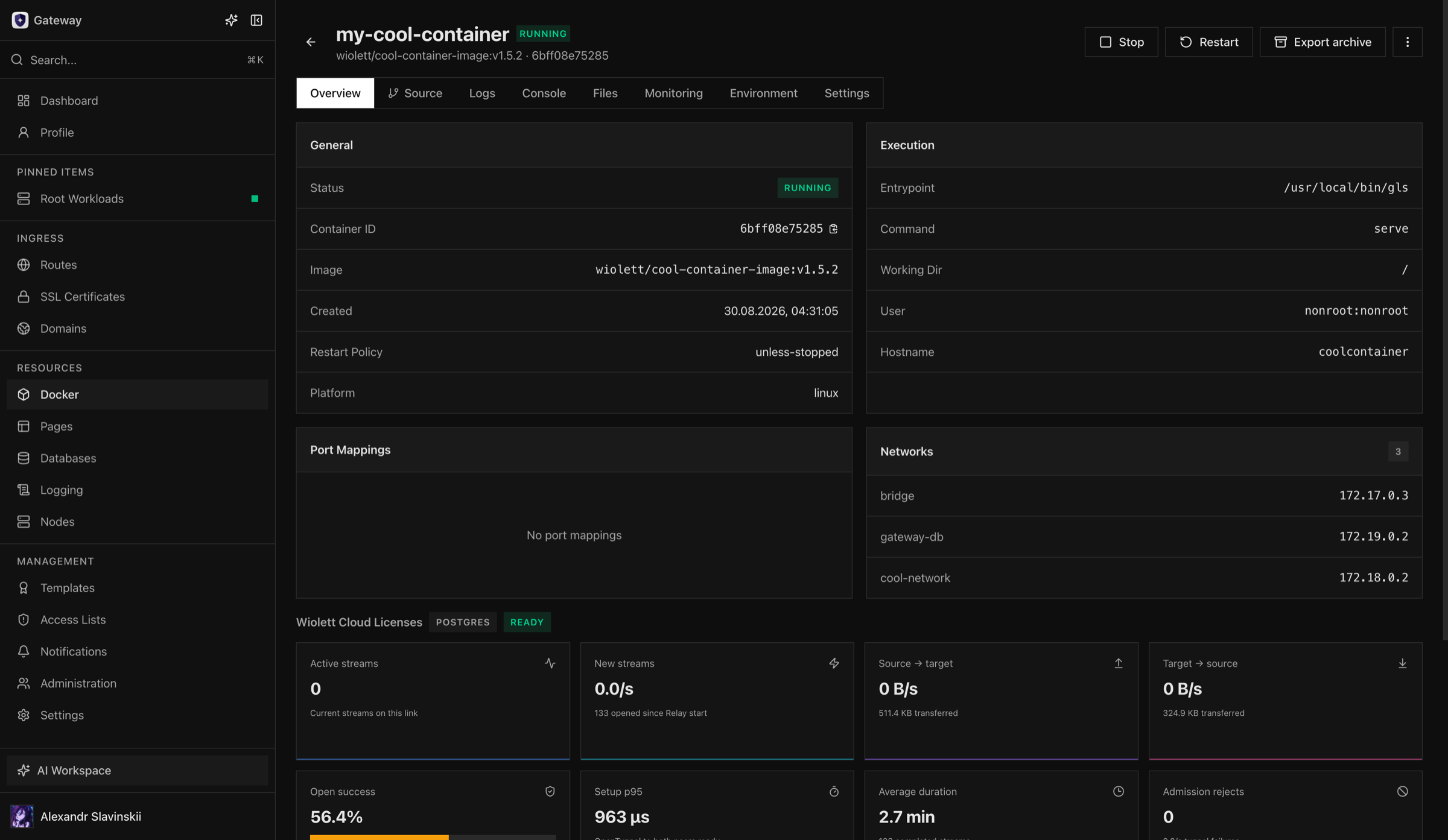
Section titled “Verify and operate”The detail view is the operational record: confirm the desired and observed state, health result, image identity, recent Tasks, and logs. The Overview names the container’s runtime profile, for example Secure · gVisor, and monitoring shows its memory and PID limits next to the usage. Stop on a container that runs nothing—created, exited, or dead—finishes at once. Use console or file access only for the scopes granted to you, and avoid using an interactive console as the normal deployment path.
After a restart or daemon reconnection, Opfield should reconcile the saved desired state. If the Container is running but cannot serve traffic, check its health check, listening port, Route target, environment, and application log in that order.
To let a Container reach one port of another workload privately, or to let other workloads reach it without publishing a port, use container links in the Container Links panel of its Environment tab.
Failure handling and cleanup
Section titled “Failure handling and cleanup”An image pull failure, unavailable registry credential, port conflict, invalid mount, unsupported runtime capability, or exhausted node resource must be corrected before retrying. While a Git build is being rolled out to the Container, lifecycle, configuration, and secret changes return BUILD_ROLLOUT_IN_PROGRESS until the rollout ends; see Git sources and Build Workers. The Task history identifies the stage that stopped; retries without changing the prerequisite usually repeat the same failure. Errors you can fix come back as client errors with their own code, for example 409 HOST_PORT_IN_USE with the port, 409 IMAGE_NOT_ON_NODE, 409 DISK_IMAGE_VOLUMES_UNSUPPORTED when the Node has no free loop device for a disk image volume, and 404 CONTAINER_NOT_FOUND. Recreating a Secure Runtime container with a GPU is refused with 409 SECURE_RUNTIME_GPU_UNSUPPORTED before the container is stopped.
Before deletion, inspect Routes, database bindings, grants, volumes, source settings, and exported data. Deleting the Container removes its resource grants and its database and storage links, so a later Container with the same name inherits neither access nor link credentials. A Container that waits for the first build of its Git source cannot be deleted on its own (409 SOURCE_CONTAINER_NOT_BUILT); delete its Git source instead. Volume deletion is a separate destructive action; retain or back up persistent data before removing either resource.
Operator details: recreate and recovery
Section titled “Operator details: recreate and recovery”A configuration change that affects image, command, environment, mounts, runtime, ports, limits, or restart behavior can require recreation. Recreation replaces the Docker runtime while preserving Opfield’s stable Container identity and supported relationships. Existing in-process sessions are interrupted, so schedule the operation or use a Deployment when interruption is unacceptable.
Before recreation, record the current image digest, health result, attached volumes, Route and binding state, and any application-specific drain requirement. After the Task completes, compare the new runtime with the saved desired state and test the real client path. If startup fails, restore the previous known-good configuration or image and recreate again; do not edit the failed Docker object outside Opfield.
If the Docker Node disconnects during an operation, wait for a fresh inventory after reconnect before retrying. The host may have completed the runtime action without acknowledging it. If a Container is missing but its desired state still exists, use the supported reconcile or recreate path. Deleting and recreating the Opfield record changes ownership and grants and should not be the first recovery action.
Console and file access are incident and inspection tools, not a substitute for reproducible configuration. Changes made only inside a running container can disappear on the next recreate and should be moved into the image, managed configuration, or persistent volume.