

Publish an application end to end
This journey takes an approved application artifact to a public HTTPS endpoint. It crosses runtime, networking, TLS, identity, and operations boundaries, so one person clicking Create should not be the only release control. Define the application owner, platform owner, DNS/TLS owner, and incident owner before production publication.
The target outcome is a service that is healthy from the user’s perspective, reachable through the intended domain, observable in Opfield, protected by the expected access policy, and reversible without rebuilding the control plane.
If this is your first deployment, prepare a Docker Node, review the Docker resource models, and keep Publish your first Route open for the ingress step.
Decide the workload model
Section titled “Decide the workload model”Choose the resource that matches lifecycle ownership:
- Use a Container for a simple standalone service where replacement is an explicit recreate operation.
- Use a Deployment when health-checked blue/green rollout and a retained rollback slot are required.
- Use a Compose Project when several services, networks, and volumes form one application and must move through one immutable revision lifecycle.
Do not model a multi-service application as unrelated standalone containers merely to make each child directly editable. That discards project ownership and makes rollback, drift, and dependent changes harder to reason about.
Before proceeding, approve the exact image digest or Git commit, expected resource limits, secret sources, volume backup policy, database dependencies, health endpoint, public hostname, and rollback target.
1. Prepare capacity and ownership
Section titled “1. Prepare capacity and ownership”Enroll or select an online Docker Node for the workload and an online Ingress Node for public traffic. Confirm that each Node has the correct role, compatible version, required capabilities, and sufficient headroom. A green Node state does not prove that a large image fits on disk or that a requested port is available.
Assign scopes before the release. The developer may need source/build visibility, the platform operator may need workload lifecycle access, and the ingress operator may need Route access. Avoid granting system administrator merely because the workflow spans several resource types.
For stateful workloads, confirm where persistent data lives and how it is restored. A Deployment rollback changes application runtime; it does not undo database writes or repair a volume changed by the new version.
2. Create or connect the workload
Section titled “2. Create or connect the workload”Create the chosen Container, Deployment, or Compose Project. Configure the immutable image digest or approved Git source, command, environment, protected secrets, restart behavior, resource limits, and managed volumes.
Prefer managed volumes or explicitly approved external storage. Host bind mounts couple the workload to one host and are not portable through normal archive or migration workflows. Do not place secrets in ordinary environment values, Compose source, build arguments, or image labels.
If the application uses a database, create the binding before final release validation so the same runtime configuration is tested. A managed binding gives the workload a dedicated database identity and may require a normal recreate or rollout to apply its environment and private network.
3. Prove application health before public traffic
Section titled “3. Prove application health before public traffic”Define health in user-relevant terms. A process being present or a TCP port accepting connections is weaker evidence than an HTTP endpoint that confirms the application and its critical dependencies are ready.
For a Deployment, configure the health path, expected status range, optional body match, timeout, interval, and slow threshold. Keep the previous slot available until the new slot has passed health and external verification. For a Container or Compose service, inspect the actual runtime state, logs, and application response before creating the public Route.
Do not route production traffic to an application that is still migrating data unless the migration strategy explicitly supports it. Long-running or destructive migrations need their own rollback and compatibility plan.
4. Prepare Domain and TLS
Section titled “4. Prepare Domain and TLS”Create or select the Domain, place it on the intended Ingress Node, and ensure authoritative DNS points to its public service address. Issue, import, or select a certificate that covers the exact hostname or an appropriate wildcard.
Separate ownership helps here: changing DNS should not require changing the workload, and rolling back the workload should not require replacing the certificate. Confirm who renews uploaded certificates and who receives expiry notifications.
5. Create the Route
Section titled “5. Create the Route”Create a Route for the Domain and select the managed workload as its upstream. For a Docker Container, Compose service, or Deployment, Opfield can establish a Secure Link so ingress reaches the workload through Relay without a host-published application port solely for this path.
Choose the application port and upstream scheme the workload actually serves. Enable public TLS and Force HTTPS as required. Enable WebSockets, prefix behavior, buffering changes, custom timeouts, or custom templates only when the application contract requires them; every exception increases the surface that must be tested.
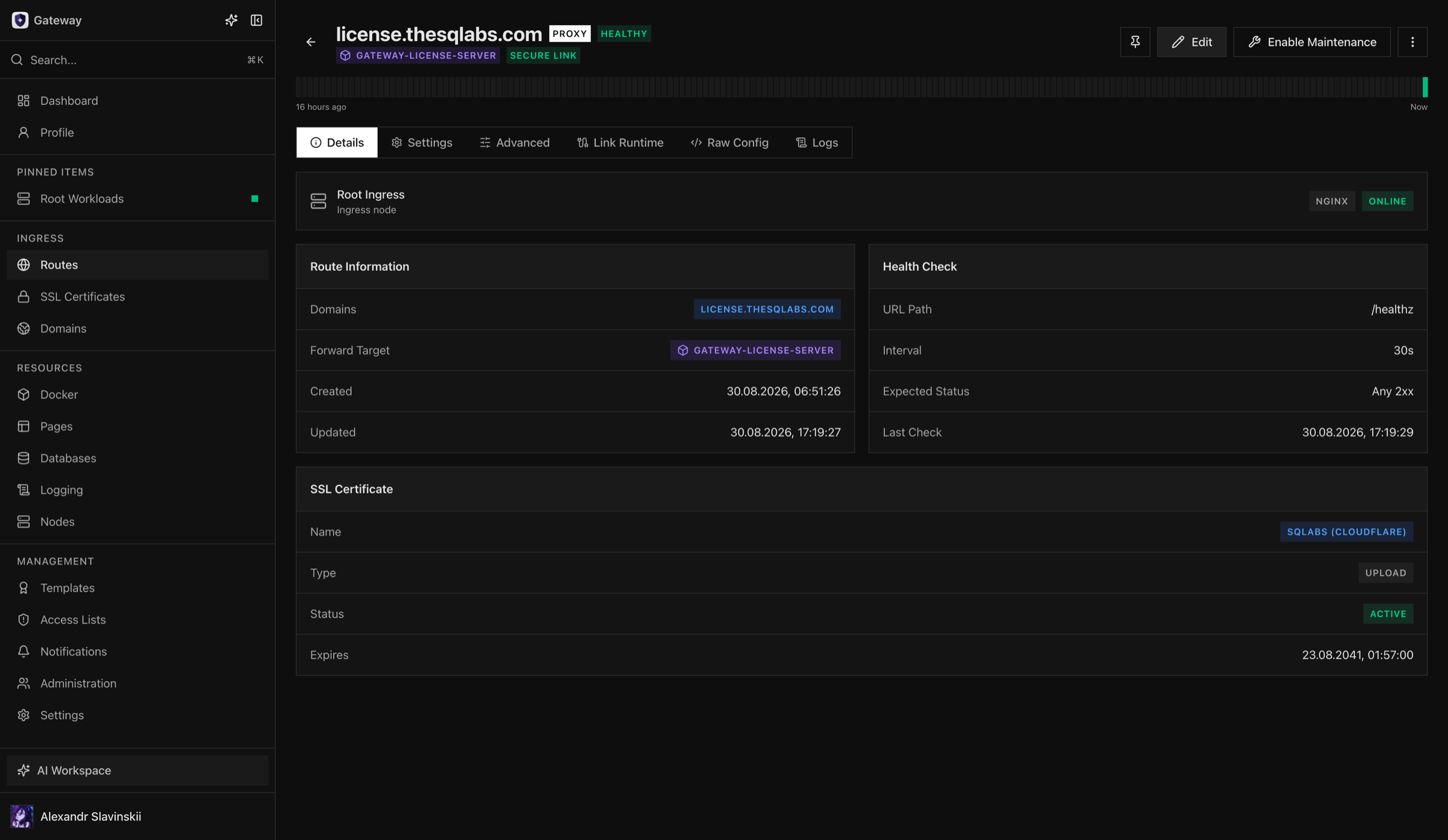
Wait for the Route and Ingress configuration to reconcile successfully. Do not edit generated nginx configuration directly: Opfield is the source of truth and will reconcile managed state.
6. Acceptance test
Section titled “6. Acceptance test”User path
Section titled “User path”- DNS resolves correctly from an external network.
- TLS is trusted and covers the hostname.
- The primary page or API endpoint returns the expected release.
- Login, callbacks, uploads, streaming, and WebSockets work where applicable.
- Maintenance and access-denied responses are intentional and branded as expected.
Platform path
Section titled “Platform path”- The workload reports the approved digest or commit.
- Runtime health, logs, and resource usage are stable.
- Route health and Secure Link runtime are healthy.
- Ingress access/error logs show the acceptance requests without repeated upstream failures.
- A restart of the workload does not lose persistent data or binding configuration.
- Notifications reach the expected responder for a controlled test event.
Governance path
Section titled “Governance path”- Least-privilege users can operate only their assigned resources.
- The release, Route change, and related operations appear in Tasks/recent activity and audit history.
- Backup coverage includes stateful volumes and external dependencies, not only the container definition.
7. Rollback and incident boundary
Section titled “7. Rollback and incident boundary”Record the last known-good target before promotion. For a Deployment, verify the prior slot remains healthy. For a Container, retain the prior immutable image digest and configuration. For Compose, retain the prior immutable revision. For Git delivery, retain the approved build and exact source commit.
If the release fails but ingress is healthy, roll back the workload rather than deleting the Domain, certificate, or Route. Use Route maintenance when traffic must be stopped while preserving the resource and its configuration. If a migration has already changed data, application rollback alone may be unsafe; follow the data recovery plan.
After rollback, repeat user-facing tests and inspect logs for requests that may have reached the failed revision. Keep the failed artifact and operation evidence until the incident review is complete.
Diagnostic map
Section titled “Diagnostic map”| Symptom | Check first | Detailed guide |
|---|---|---|
| Workload never becomes ready | Owning Task, application logs, port, and health check | Docker overview |
| Route does not publish | DNS, TLS, nginx apply, Route health, and upstream | Ingress troubleshooting |
| Secure Link is unavailable | Both Nodes, Relay, target workload, and connector operation | Secure upstreams |
| New release is unhealthy | Roll back the owning workload; keep the Route intact | Blue-green Deployments |
| Migration changed data | Stop writes and follow the separate data-recovery plan | Updates and backups |