

Domains, Routes, and TLS
For managed Cloudflare DNS, configure the Cloudflare integration before selecting zones and creating Domain records. A DNS connector does not replace the ingress node or its TLS configuration.
This resource chain turns an application into a stable public endpoint. A Domain represents the hostname and where it is served, a Route defines what Opfield does with matching requests, and a TLS certificate proves the hostname to HTTPS clients. The intended outcome is one accountable owner for the hostname, encrypted traffic, an explicit upstream, and a verifiable rollback path.
Before implementation, decide who owns DNS, certificate renewal, application health, and production cutover. Opfield can coordinate these resources and supported provider actions, but external DNS and application readiness remain outside its control unless an integration explicitly manages them.
Success means the canonical hostname resolves to the intended Ingress Node, HTTPS presents the expected certificate, the Route reaches the intended application, and both Opfield health and an independent external request agree.
Domains
Section titled “Domains”Register each hostname once and assign it to an eligible nginx node with a detected public service address. A Route and its Domain must remain on the same node. Cloudflare-managed Domains can reconcile A/AAAA records; external DNS remains the operator’s responsibility. Opening a Domain only reads its DNS records; Opfield repairs Cloudflare records only when you ask for it.
Through the API and MCP, nginxNodeId can be omitted when exactly one eligible node with a detected public address is open to the caller’s domains:create grant. Otherwise the request fails with 409 DOMAIN_NGINX_NODE_REQUIRED and lists the eligible nodes. GET /api/domains/nginx-nodes, or manage_domain with the list_nginx_nodes operation over MCP, lists them for any holder of domains:create; no Node permission is needed.
Certificates
Section titled “Certificates”Issue Let’s Encrypt certificates through HTTP-01 or DNS-01, or upload existing material. HTTP-01 requires the assigned node to be publicly reachable on port 80. Opfield distributes private key material only to nodes with enabled TLS Routes that use it.
Routes
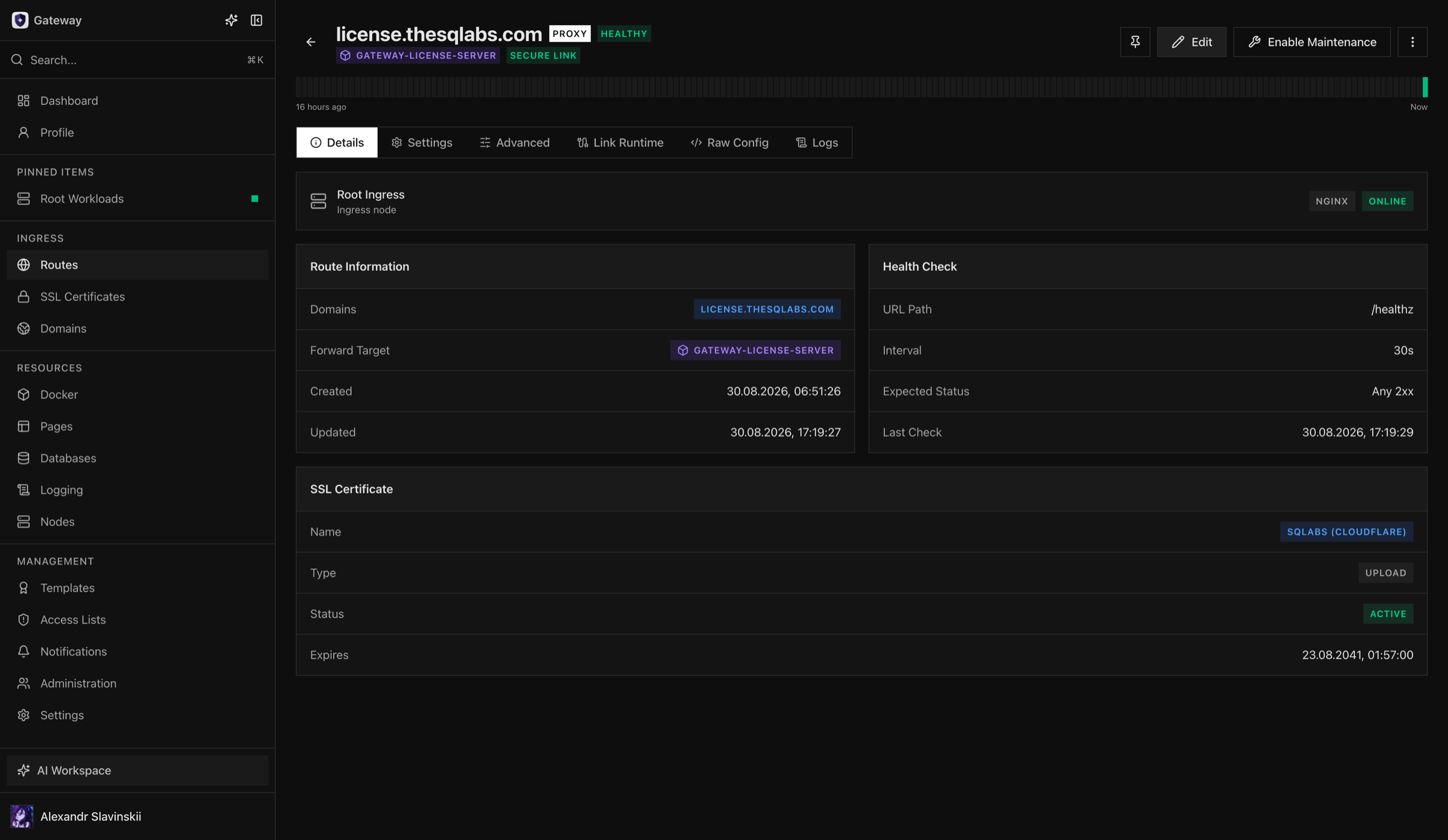
Section titled “Routes”Choose the Domain, behavior, upstream, TLS certificate, and health policy. Enable WebSockets, rewrites, headers, buffering, or timeout changes only when required by the application.
An Ingress Node answers TLS only for hostnames that one of its Routes serves. A TLS request for any other name is rejected during the handshake instead of receiving another Route’s certificate and site. The daemon update installs this on existing nodes; where the node’s own nginx already has a default server on port 443, the update skips it and logs a warning. When nginx rejects a configuration change, the change fails with 422 NGINX_CONFIG_FAILED on HTTP and HTTPS Routes alike, and the error includes the nginx -t output; the Node keeps its previous configuration. A Route without health checks is labelled No health check.
Raw Config Mode hands the Route’s whole nginx configuration to you. It starts from the rendered configuration, and Opfield stops rendering the Route until raw mode is switched off. A Route to a Docker workload keeps its Secure Link in raw mode: the seeded upstream, the link’s socket on the Ingress Node, keeps reaching the workload and follows it when its container is recreated, so edit the configuration as needed but keep proxying to that upstream. Raw configuration, nginx template content, and the advanced configuration of Additional Routes pass the same directive checks: without proxy:unrestricted, denied directives are refused and nginx logs can be written only under /var/log/nginx.
Two enabled Routes on the same node cannot serve the same name, because nginx would serve only one of them. Creating, enabling, or editing a Route, or moving it to another node, so that it serves a name that another enabled Route on that node already serves fails with 409 PROXY_HOST_DOMAIN_CONFLICT, which names the other Route. Names are compared without regard to case. Routes that already overlapped before the update to 2.11 keep their configuration; see Conflicts resolved by the 2.11 update.
Choose the Ingress Node
Section titled “Choose the Ingress Node”A Route runs on one nginx Ingress Node, or on every member of an ingress group. In the Create Route dialog, choosing a registered Domain fills in its node. Users who may create Routes broadly or in a folder can also select Automatic (from the registered domain) and let Opfield choose; if it cannot, the error lists the nodes to pick from. Through the API and MCP, nodeId is optional on POST /api/proxy-hosts and create_route, and Opfield resolves the node in this order:
- An explicit
nodeIdis used as given. - Registered Domains among the Route’s names pin their Ingress Node, matched exactly or through a covering wildcard. Registered Domains on different nodes cannot share one Route:
409 DOMAIN_NGINX_NODE_MISMATCH. - Otherwise, the only nginx node on which the caller may create Routes at that destination is used, provided it is online. Nodes that are still pending enrollment are never chosen or offered. A Route is never placed automatically on a disconnected node; pass that node’s ID explicitly if you want it there.
- Otherwise the request fails:
409 ROUTE_INGRESS_NODE_REQUIREDwhen several nodes qualify or the only one is offline, with the nodes listed in the message and indetails.eligibleNodes;409 ROUTE_INGRESS_NODE_UNAVAILABLEwhen none is available; or403when the caller has noproxy:creategrant for the destination.
GET /api/proxy-hosts/ingress-nodes, or list_route_ingress_nodes over MCP, lists the eligible nodes with only their ID, display name, hostname, and status. It needs any proxy:create grant and no Node permission. A broad or folder proxy:create grant covers every nginx node, a grant on node/<nodeId> covers that node only, and nodes locked for new services are never offered. Pass folderId when the Route will be created in a folder; a folder-limited creator must pass it in any case. The resolved node goes through the usual checks: the node grant, the destination folder, the Domain’s placement, and the service-creation lock.
Migration
Section titled “Migration”Use the explicit ingress migration workflow to move a Domain and its Routes. Cloudflare DNS can be changed during cutover; external DNS requires an operator-confirmed update. Verify the target before removing the source placement. If an enabled Route on the target node already serves one of the moving names, the migration is refused with 409 DOMAIN_INGRESS_TARGET_DOMAIN_CONFLICT before anything changes.
Prerequisites and permissions
Section titled “Prerequisites and permissions”The target Ingress node must be online, report a usable service address, and support the intended certificate challenge. The caller needs access to the Domain, Route, certificate, target workload, and any reusable Access List involved in the change.
For externally managed DNS, lower TTL before a planned migration and record the current records. For Cloudflare-managed DNS, verify the connector scope and zone allowlist before asking Opfield to mutate records.
Configure the complete chain
Section titled “Configure the complete chain”- Create or select the Domain and place it on an Ingress node.
- Confirm DNS points to the selected public service address.
- Issue or upload a certificate covering the exact hostname.
- Create the Route and select proxy, redirect, or 404 behavior.
- Select the upstream and application protocol.
- Attach TLS, access policy, health checks, and protocol options.
- Save and wait for nginx validation and apply.
- Verify the public endpoint from outside the managed network.
For wildcard or multi-name certificates, verify every hostname before reuse. Certificate existence alone does not mean it is distributed; distribution follows enabled TLS Route placement.
Change and deletion consequences
Section titled “Change and deletion consequences”- Moving a Domain changes where all of its Routes are served.
- Replacing a certificate affects every attached TLS Route after distribution.
- Disabling a Route preserves configuration but stops the managed virtual host.
- Deleting a Route retires Route-owned Secure Links but does not delete reusable certificates or Access Lists.
- Deleting a Domain requires its dependent Routes to be removed or migrated first.
- A certificate that a Route or the Pages wildcard profile uses cannot be deleted: the request fails with
409 CERT_IN_USEand the IDs of the Routes that use it. Detach the certificate first; deleting it then removes Opfield’s managed copy.
Verification checklist
Section titled “Verification checklist”- External DNS resolves to the intended node.
- HTTP behavior is deliberate: redirect, response, or disabled.
- HTTPS serves the expected certificate and complete chain.
- Health checks use the intended path and expected status.
- WebSocket and timeout settings match the application.
- nginx configuration is valid and the latest revision is acknowledged.
- Access and error logs show the external verification request.
Renewal and placement changes
Section titled “Renewal and placement changes”Certificate renewal and Domain migration are separate operations. A renewed certificate must be issued successfully, stored by Opfield, distributed to every eligible Ingress Node that serves an attached TLS Route, and acknowledged by nginx. Check the new validity period and the certificate served externally; a successful issuance record alone is not the final verification.
For placement changes, prepare the target Node before changing DNS. Confirm nginx capability, public service addresses, certificate availability, Route configuration, upstream reachability, and health checks on the target. When DNS is external, change the records only after the target is ready and keep the source available for at least the expected TTL and cache window. When Opfield manages Cloudflare DNS, still verify the resulting public answers rather than assuming that the provider operation completed everywhere immediately.
Failure and rollback boundaries
Section titled “Failure and rollback boundaries”If configuration validation fails, the invalid revision must not replace the last acknowledged nginx configuration. Read the validation error, correct the smallest relevant setting, and apply again. Do not detach a working certificate or move the Domain merely to bypass a syntax or upstream-selection error.
If a migration fails before DNS cutover, keep traffic on the source and repair the target. If external DNS was already changed, restore the recorded source records or complete the target repair according to the incident decision; avoid alternating records repeatedly because recursive resolvers may observe different states. After rollback, verify both public address resolution and the certificate actually served by the source.
Opfield cannot roll back application writes or external DNS changes that occurred outside its managed workflow. Preserve the previous DNS values, certificate assignment, and application revision as part of the change record.