

Authentication, users, and groups
This area answers two management questions: how people prove who they are, and how Opfield limits what they can change. The identity owner maintains sign-in and recovery; resource owners define operational groups; security administrators review privileged access. Success means people can recover access without bypassing controls, and a role change can be applied and audited without rewriting every resource.
Opfield supports independent OIDC, local-password, and email one-time-code authentication. Passkeys are enrolled after account creation. MFA policy can require enrollment before a user receives a normal session. Sign-in methods, multi-factor authentication, the OIDC provider, and identity provisioning are configured under Settings > Authentication.
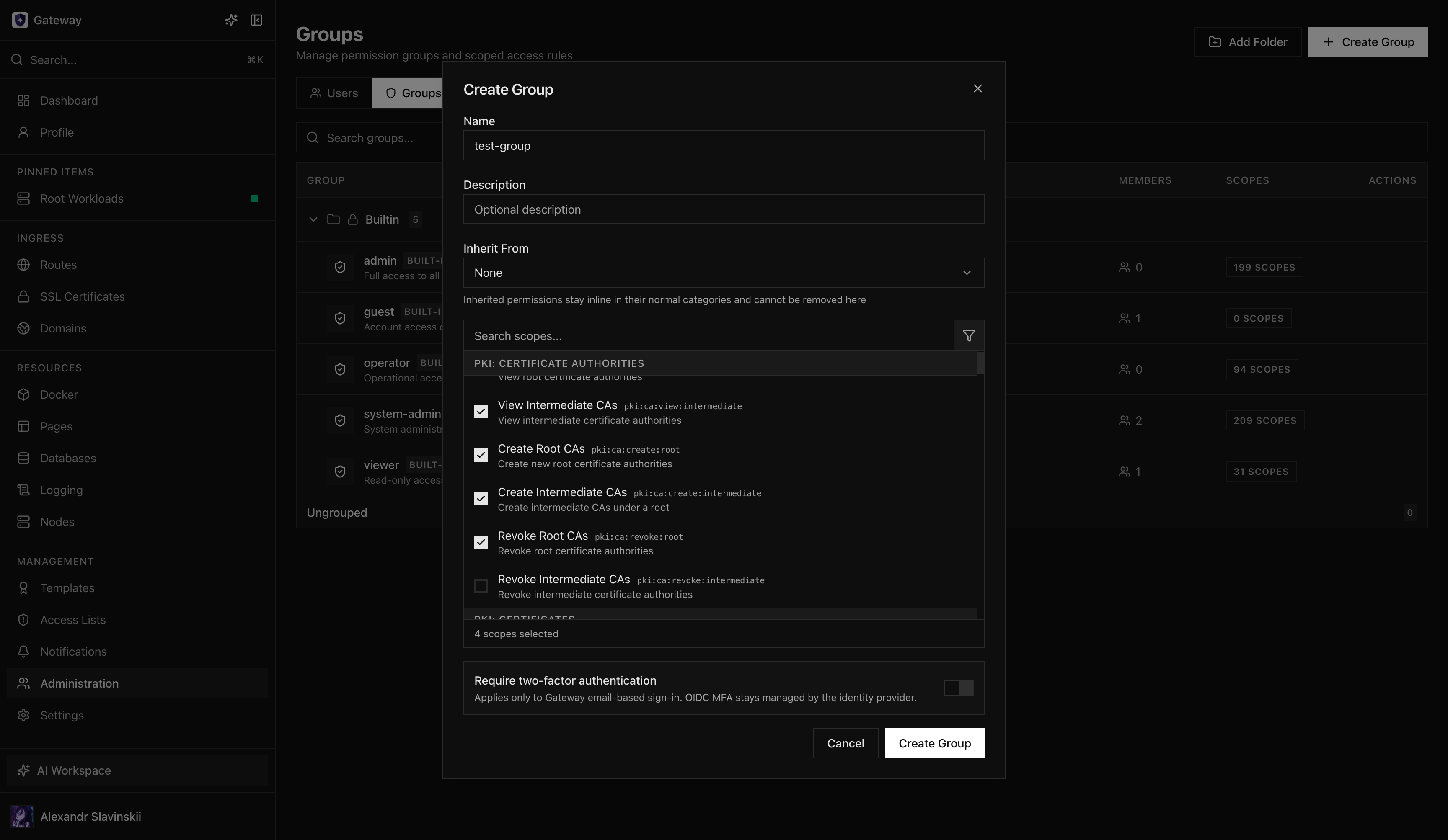
Use groups as the normal permission boundary. Keep a small, auditable administrator group and separate operators, developers, observers, and automation. Blocking or deleting a user revokes access while preserving historical attribution. Restoring a deleted user leaves the account blocked until explicitly enabled.
Impersonation is an administrative support flow and must remain distinguishable in session purpose and audit records. Stop impersonation to restore the original administrator session; do not issue normal API tokens from an impersonated session.
Opfield does not provide SCIM yet. SCIM support is planned; until it arrives, use the supported administration API with scoped OAuth automation when your identity system can call external APIs, or maintain a documented manual process.
Authentication design
Section titled “Authentication design”Enable at least two administrator recovery paths before depending on an external identity provider. Test OIDC redirect and logout behavior, email delivery, local-password recovery, MFA enrollment, and recovery codes with non-production accounts.
OIDC proves identity but does not automatically grant broad product access. Opfield permissions remain explicit. If the external provider is unavailable, only independently configured methods can restore access.
User lifecycle
Section titled “User lifecycle”- Create or invite the user through an approved authentication path.
- Require MFA according to policy before granting sensitive scopes.
- Add the user to role-based groups rather than assigning one-off permissions where possible.
- Verify the user can access one intended resource and is denied one out-of-scope resource.
- Review sessions, tokens, and group membership when the user’s role changes.
- Block the account immediately when access must stop.
- Delete only after ownership and automation dependencies are transferred.
Blocking stops new use without erasing attribution. Deletion remains visible in audit history. Restoring a deleted record does not silently reactivate it.
Invitation emails
Section titled “Invitation emails”An invitation email tells a new user that an administrator created their Opfield account and links to the sign-in page, with one hint for their sign-in method: the identity provider, an email code, or the separate email that sets their password. Sending needs verified SMTP and the Opfield public URL.
- Send invitation email in Administration > Users > Configure User, in the Account panel, sends it by hand. It is offered once per user and only until their first sign-in; after sending, the panel shows when it was sent. It needs
admin:userson that user. - Settings > Authentication > Identity provisioning > Send an invitation email when an account is created sends it for every account created in the Console, the API, or MCP. It is off by default and needs
settings:gateway:editto change. If sending fails, the account is still created and the invitation can be sent later by hand.
API: POST /api/admin/users/{id}/invitation; MCP and assistant: manage_user operation send_invitation. The user list returns lastLoginAt and invitationSentAt for each user.
Group design
Section titled “Group design”Separate platform administration, security administration, application operation, development, read-only observation, and automation. Use resource-scoped grants for one folder, Route, Node, workload, database, or Pages Project instead of granting an entire product area.
Keep the administrator group small and maintain a documented break-glass path. Test permission changes with a real non-admin session; an administrator view cannot prove that deny boundaries work.
Impersonation and support
Section titled “Impersonation and support”Use impersonation only for a bounded support investigation. The session must remain visibly marked and auditable. Do not change credentials, create durable administrator tokens, or perform unrelated work while impersonating another user. Stop impersonation before returning to normal administration.
Provisioning before SCIM
Section titled “Provisioning before SCIM”SCIM provisioning is not available yet and no release date is guaranteed. Until it is released, keep a joiner/mover/leaver checklist and reconcile users and groups manually or through supported REST API and OAuth automation. Give the automation client only the user and group scopes it needs, make requests idempotent, and verify one expected grant and one expected denial after every access change.
Recovery and lockout prevention
Section titled “Recovery and lockout prevention”Treat identity configuration as a production dependency. Before changing the only working sign-in method, create and test a second administrator path in a separate browser profile. Keep recovery codes outside Opfield, verify that local-password recovery email reaches the intended mailbox, and record which team owns the OIDC application and its client secret. Do not disable the previous method until a fresh session can sign in, complete MFA, and reach an administrator-only page through the replacement path.
If administrators are locked out, restore the failed external dependency or use the previously tested independent method. Avoid editing user, session, or group rows directly in PostgreSQL: bypassing the application can leave password, MFA, session, and audit state inconsistent. After access returns, review recent authentication events, active sessions, group membership, and recovery-code status before treating the incident as closed.
Verification checklist
Section titled “Verification checklist”- Sign in through every enabled method with a non-production account.
- Confirm MFA enrollment is enforced before a normal privileged session is issued.
- Verify a blocked user cannot create a new session or use an existing token.
- Verify a restored user remains blocked until explicitly enabled.
- Test one allowed and one denied resource action for each operational group.
- Confirm impersonation is visibly marked and the audit actor remains attributable.
- Reconcile inactive users, unused groups, stale sessions, and outstanding invitations on a schedule.
Authentication proves who the caller is; groups and scopes decide what that caller may do. A successful OIDC login must never be used as evidence that the user should receive broad Opfield authority.